“Where my reason, imagination or interest were not
engaged, I would not or I could not learn." Winston Churchill
Technology permeates our society in a way that has never been experienced
before. Our students are immersed in the online world, with almost 80% actively participating in chat rooms, blogs, multimedia, games and
social networking from a young age, with no understanding of
the dangers their digital footprint can have on their lives. (Brody 2006) They are in essence addicted to the instant communication and satisfaction
wrought by digital interactions.
Online
learning is not the next big thing, it is the now big thing.” -
Donna J. Abernathy
Many teachers still express anxiety when they
need to engage students through digital means (Anastasiades&Vitalaki 2011). From what I've learned of pedagogy, it is our
responsibility as teachers to understand the world of our students so we may
better engage them in the curriculum. Elearning is about using this digital
world to RELATE to and ENGAGE with our students so that they may actually WANT
to learn. And so we will investigate, vet and implement any tools necessary to
generate that third space and create a positive learning environment.
“Teaching in the Internet age means we must teach tomorrow’s skills today.” - Jennifer Fleming
The range of ICT tools available is constantly
growing. There are thousands of available resources locatable through Scootle alone.
To explore others requires time to not only learn the tool, but also to
consider how to apply it for learning benefits. This is all time outside of
that spent in class too.
“People often tout interactivity as the great benefit offered by
eLearning, yet most interactivity does nothing to either engage or instruct.” - Ethan Edwards
In the first week of this course, we were introduced to works of Dr Judy
Wills, who highlighted the importance
of stimuli to bypass various brain filters and access reflective thinking. Later, we looked at multimodal
learning, which builds on these and includes the concepts of convergence and cognitive overload.
With these aspects in mind, careful consideration of the use of ICT's
is essential to effect digital pedagogy. The TPACK framework describes how
teachers require a careful mix of content knowledge, personal pedagogies and
technological literacy in order to maximize learning goals. One such method we
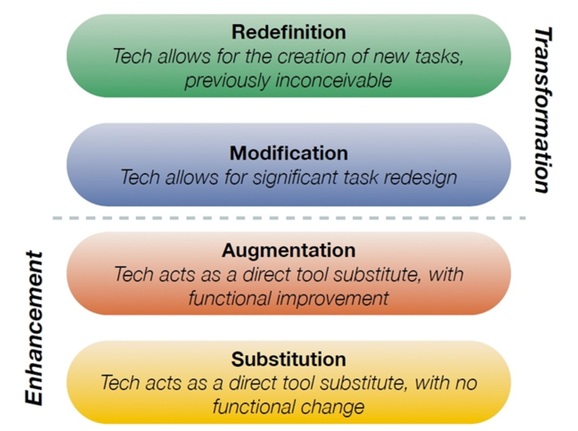
use to categorise our tech literacy is the SAMR model.
“Teachers need to integrate technology seamlessly into the curriculum
instead of viewing it as an add-on, an afterthought, or an event.” - Heidi-Hayes
Jacobs
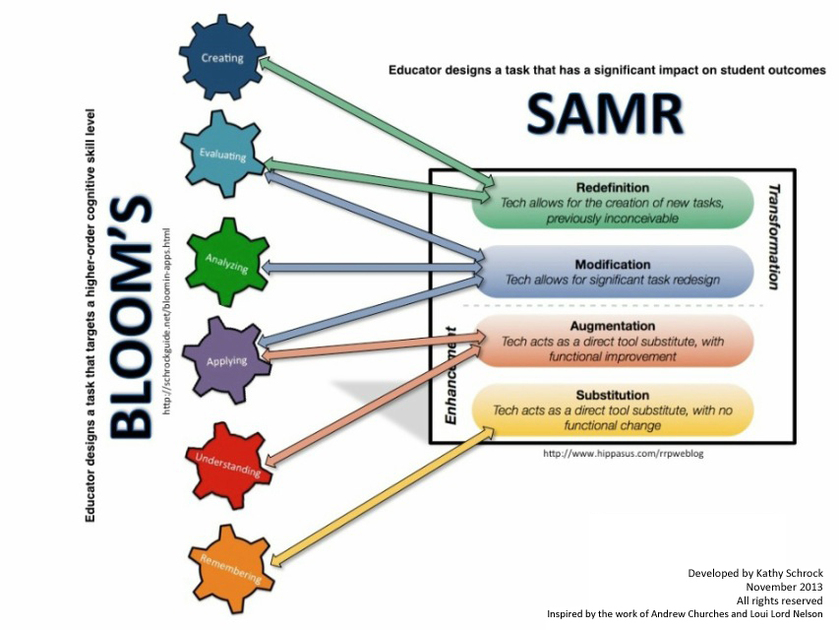
In my first post, I made a correlation between the four 'ism' learning
theories and the tiered dimensions of learning (Marzano 1997), being acquistion
(behaviourism), extension (cognitivism), refining (constructivism) and
application (connectivism). I later made a direct link between these learning
theories and the SAMR model, and have been using it as a ranking tool of
various techs in relation to their improvement on traditional teaching means. However
I have been rather vague on how the user benefits from generating content with
these tools.
“Think about what your learners need to do with that information after the course is finished and design around that.” - Matthew Guyan
Webpages and powerpoints are primarily Substitution methods for the user
to deliver ideas and demonstrated knowledge to an audience. The inclusion of
multimedia makes it interesting and possibly engaging for the audience, but is
only indicative of declarative knowledge by the presenter.
Devices such as Prezis, Glogsters, timelines, mind maps and images are
Augmentations. These cause the user to make connections and correlations
between bits of information. extending and building off a central theme.
Interactive learning objects, such as games or Google Maps/Earth are not only a demonstration of Redefinition and connectivism from a learners standpoint but also from a design one too. They require a solid understanding of content and design, which works best by observing work outside of your comfort knowledge zone. How can you tell if it works as an education tool if the only people who see it are ones that already share your knowledge?
“eLearning is changing. And, we will see new models, new technologies
and designs emerge. So, let’s drop the “e” – or at least give it a new and
wider definition.”
- Elliot Masie
A NOTE ON ETHICS
"Ethical decisions ensure that
everyone's best interests are protected. When in doubt, don't."
Harvey Mackay
As teachers we need to assess ICT's not only on how they can be used, but also how they may be misused in the classroom. Collaborative tools like wiki's need to be carefully monitored for harassment and arguments that escalate. New websites or resources need to be vetted for content to ensure not only is it relevant and accurate, but also does not breach any legal barriers, including school or community guidelines for appropriate content. This becomes a problem when encouraging students to engage in their own research. It is for this reason that referencing is such an important aspect of assessment, as it covers the students legally if they have breached copyright, and helps direct the teacher to understand the students research methodology.
There are also more insidious repercussions of online interactions that need to be addressed. De-identification of all students on any material to be posted online is a policy I'd like to implement, along with ensuring any school logos on uniforms are photo shopped out of images. Clearly defined rules on what can and cannot be included need to be established early, with a chain of communication available for clarification on any resources students wish to include in their projects.
REFERENCES:
http://www.cybersmart.gov.au/Teens.aspx
Brody, M. (2006).
Understanding teens in this age of digital technology. Brown University Child & Adolescent
Behavior Letter, 22(12),
Moodle course notes for EDED20491:ICT's in Learning Design, obtained (2015):
https://moodle.cqu.edu.au/course/view.php?id=263
https://moodle.cqu.edu.au/course/view.php?id=263
http://www.instructionaldesign.org/theories/cognitive-load.html
MacFarlane, M. A. (2007). Misbehavior in Cyberspace. School Administrator, 64(9), 4-8.
C. Fadel, C. Lemke, (2008) Multimodal Learning Through Media:
What the Research Says, Metiri group, Cisco Systems, Inc.
What the Research Says, Metiri group, Cisco Systems, Inc.
Anastasiades, P. S., & Vitalaki, E. (2011).
Promoting Internet Safety in Greek Primary Schools: the Teacher's Role. Journal Of Educational
Technology & Society, 14(2), 71-80
Henderson R. (2013) Teaching Literacies in the middle years,
Oxford University Press, Normansby Road, VIC.
Marzano R, Pickering D, Arrendondo D, Blackburn G, Brandt R, Moffestt, C, Paynter D, Pollock J, Whisler J (1997) Dimensions of Learning: Teachers manual 2nd ed. McREL, Parker Road, Aurora, Colorado
Marzano R (2007) The Art and Science of Teaching, ASCD, Beauregard st, Alexandria VA 22311 1714 USA
Quotes obtained from:http://elearningindustry.com/inspirational-elearning-quotes-for-elearning-professionals
.